Latest Games
Showing posts with label Android Softwares. Show all posts

Twitter 5.18.1

Current Version: 5.18.1
Requires Android: 2.2 and up
Category: Social
Size: 13.3M
V5.18.1 update:
This update includes several improvements and bug fixes.


Overview:
Twitter is a free app that lets you connect with people, express yourself, and discover more about all the things you love.See what your favorite celebs and athletes are chatting about. Be the first to hear breaking news. Catch a glimpse behind the scenes at concerts, sporting events, and more.
Then join the conversation: Tweet your own text, photos, and video to your followers — and maybe make a few fans along the way.
Get inspired. Be social. Even send private messages to friends. All in real time, as big (and little) things happen, from anywhere you happen to be.


DOWNLOAD:

Download from Google Play: Twitter 5.18.1 on Play Store

Download from Direct link: Download Twitter 5.18.1 (Right click and choose save link as. And then save apk file)


Twitter Twitter

Elegant – GO Launcher Theme


Elegant - GO Launcher Theme-1 Elegant - GO Launcher Theme-2
Premium theme for FREE!
Brief Introduction
Specially designed for GO Launcher EX, provides delicate app icons, wallpapers, folder and app drawer interface. Get it right now and have a completely new makeover of your Android smartphone.
Notice:
GO launcher theme is only available for phones with GO Launcher EX installed.
Download here “GO Launcher EX” .
***How to Apply the Theme
1. Directly open the theme after successful installation.
2. or back to Menu>Theme, choose a theme you like and apply it to your phone.
Size : 3.9M
Current Version : v1.1
Requires Android : 2.0 and up
Download

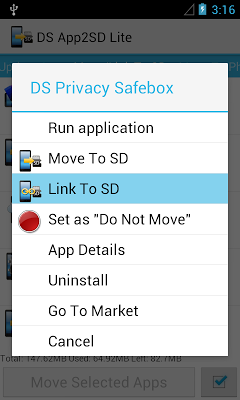
DS Super App2SD Lite

DS Super App2SD Lite

DS Super App2SD Lite-2DS Super App2SD Lite-1
Description
(A paid version “Droidsail Super App2SD Pro”is released, which removed ads and add one key “Move System Update App” to SD card (save even more space), and more batch operations. :)
Move more apps to SD card!!! New version support Link2SD now!!!
This is a super APP2SD tool for ROOTed user (Android 2.2 and above), which could force move/link more apps (even those apps marked with internal only :) to SD card (or move/link back phone) and save more space than normal App2SD apps.
You can also perform batch move apps, set default install location of apps, clear cache with this app.
And this app have full functions (no limitation) with ads. Simple is the best! :)
System Requirement:
1. A ROOTed phone;
2. USB debugging enabled (Go to System Settings->Application->Developemnt->USB debugging);
3. Link2SD function requires external SD card supported on device;
ATTENTION:
(App2SD)Some app which has widget/alarm/wallpaper/InputMethod in using is not recommanded to be moved to SD card, which may cause problem.
(Link2SD)”Link2SD” feature requires your device supports external SD card, and create dedicated partition for it. And we recommend to use EXT2, EXT3 format. In addition, once “Link2SD” is used, do not remove the SD card at run time, or reboot device after pull out the SD card, and, do not modify or delete “/dsapps/dslink2sd” folder on that partition, which may cause unexpect problem.
Link2SD Initialization:
(Please create the additional partition on SD card and format it to EXT2 or EXT3 by self, e.g. on a PC.)
User need to initialize the “Link2SD” feature. Launch the app, click target app to be linked in list and select “Link to SD”. If not initialized, the app will automatically guide the user to initialize.
The first step is to choose the SD card partition. The app will list all available SD cards and partitions, for example, the second partition on the first external SD card will be called SD card 1, Partition 2. Please select additional partition, do not select the default FAT32 partition.
The second step is to select the partition format. (We also provide an “AUTO” option, user can try AUTO if other specified format does not work.)
The third step is to apply settings, and the app will prompt the user to reboot to take effect. After reboot, if the initialization is successful, click target app and select “Link to SD” again, you will see linking dialog. But if failed, the app will show initialization dialog again, please check the partition and format and try above steps again.
Features:
1. List all movable apps;
2. Move apps to SD card (even marked with internal only);
3. Move apps back phone;
4. Link apps to SD card;
5. Unlink apps from SD card;
6. Batch move apps (silent mode, user free);
7. Set default install location of apps(Auto/Internal/SD Card);
8. Show total/used/left space of phone or SD card;
9. 1 tap to clear all app cache;
10. Sort apps by name, size, install date;
11. Run installed apps;
12. Uninstall apps;
13. View app on market;
Size : 629k
Current Version : 7.2
Requires Android : 2.2 and up


iPhone lock Screen Theme 3.1 Android


Current Version: 3.1
Requires Android: 2.0 and up
Category: Casual
V3.1 update:
version 1.5
NEW: Now you can set the lock screen as a launcher to replace your home launcher or use it side by side to your home launcher.
latest version:
Removed over 15 permissions that users were not comfortable to comply with the latest change in Google Policy.
No more virus or adware warnings
Overview:
★ iPhone 5 lock Screen Theme ★
Iphone 5 Slide to unlock screen is a prank app to fool your friends that you have the screen to unlock feature of the newest iPhone 5 screen that comes with a fully functional set of icons just like iphone 5.
Slide to unlock and the iphone 5 screen will appear.
When you click the icons we direct you to inbuilt or installed apps. if you haven’t installed the app, we redirect you to an advert that supports this free app.
When you press home key you will have the dialog to complete action using several options to use, our custom home launcher or your native launcher, choose iPhone 5 launcher and select use as default for this action. Now it will work without showing the pop up.
If you wish to change back to you native home launcher. Go to installed apps, select iPhone 5 launcher and click set it to default.
★ Features ★
✓ Set is as your default launcher and use it like your native launcher.
✓ A lock screen just like iPhone 5. Slide to Unlock
✓ All user installed apps are retrieved. So you can use them without leaving the app.
✓ A whole new HD iPhone 5 icon set optimized for all screen sizes.
✓ Swipe down for notifications! Now you can access notifications without having to leave the app.
✓ Battery life images to emulate the system’s actual battery level.
✓ 24 functioning icons. Each link to user installed apps, if the app is not installed, we direct you to an ad. The advertising revenue helps us support this app and future improvements so please bear this in mind ;)
✓ Five different themes. Check out the options menu settings to change the background of the theme.
Licence : iPhone is a trademark of Apple Computer Inc.
All images and ideas are registered trademarks of Apple Computer Inc.
– Disclaimer –
THIS IS NOT A VIRUS. This app does nothing harmful. Some antiviruses indetifies ads as “adware” but this app just uses shortcut ads and NO push ads. This will go to support this free app. Thanks all for your understanding.
iPhone lock Screen Theme iPhone lock Screen Theme
Download from Play Store:
Download for free:

Internet Booster 1.6 for Android


Current Version: 1.6
Requires Android: 1.6 and up
Category: Tools
V1.6 update:
- Removed All unwanted permissions.
- removed intrusive ad networks.
-Optimization,
- Bug fix
-updated Algorithm
Overview:
Internet Booster is the application that will boost up your internet connection by 25-50% , you can boost MTU, clear DNS cache, change android files settings and speed up downloading your files.
Functions: clear dns cache, boost MTU to better ping, speed up downloading, better video prebuffering for example in youtube application, clear browser cache and optimize browser settings by turn on experimental browser functions like 2D accelerating, better ping in games, faster opening websites by short time of refreshing.It will reduce your memory and CPU usage as well as allocate new video memory for your graphics device (GPU).
if you have any problem regarding this app then please mail us before leaving comment. we assure you about the solution.
This app might not work on some android devices, we regret for that.
Permissions:
internet and related permissions are needed for better user experience
Disclaimer: This Internet booster is a pure placebo. Use this application only to prank your friends. with the help of this app we can make our users believe that their internet is indeed working faster and thus make them happy.We disclaimed every questions, about advertisement and about placebo, have EULA in application. We are clear and do right with Google Policy Program and Content Rules.
for internet booster, check XDA thread for more information
if you dont know about rooting your phone check http://xda-developers.com and more info about the patch (original source where i take this) http://forum.xda-developers.com/showthread.php?t=1346680
Internet Booster Internet Booster
Download from Play Store:
Download for Free:

Documents To Go 3.0 Full (Android)


View and edit documents files on your Android! Documents To Go Full is the Most powerful apps to manage your Documents on your Android.
Features :
★ Supported file formats include .doc,docx,xls,xlsx, ppt,pptx.
★ No 1 best Selling Office app
★ Over 25 millions download
★ Edit , View & Create Microsoft Word,Excel, & PowerPoint files & high fidelity viewing of your PDFs.
★ Word To Go
★ Slideshow To Go
★ Sheet To Go
★ PDF To Go
★ Support Google Doc
★ Sync Desktop Files
★ Send and receive attachments
★ Supports password protected Word & Excel 97-2010 files
Screenshot :
Documents To Go 3.0 Full Screenshot Documents To Go 3.0 Full Screenshot Documents To Go 3.0 Full Screenshot
Version : 3.003
File Size : 5.4 MB
Price In Google Play (Key) : $14.95
Download Free Now!

DOWNLOAD SD MAID PRO 2.0.2.3 for Free


SD maid pro will help you keep your device neat, clean and tidy!
Give it a try, you won’t find a more thorough cleaning app! Choose a tab, press check and then either click a single item to delete or press the clean all button. It’s just that easy.
There are various features available:
★ Explorer is a full fledged filemanager, use it to crawl through your Androids files.
★ You can use the Searcher if you know what file you are looking for.
★ The CorpseFinder searches your device for dormant directories+files and compares those to the list of installed applications.
★ AppControl lets you freeze,reset and remove applications (even system apps).
★ The SystemCleaner scans your device and filters which directories contain unnecessary files. You an even create your own filters!
★ You can optimize and shrink bloated databases to speed up access and free space.
★ View your biggest files and find out what is hogging all the space.
★ Find files that have been modified in the last X minutes. And more…
SD Maid is constantly being developed and is designed very carefully. Due to the vast amount of android devices it might not work perfectly on everyones device, but i’m working hard to get it there.
SCREENSHOT :
SD Maid Pro Unlocker

Price : $2.30
Or

Build Prop Editor (Android)


Edit Prop file with Build Prop Editor. Enjoy the the best prop editor for your Android.
Remember to keep a backup of your current build.prop. Changing build properties can potentially harm or soft brick your device.
Root and busybox are required for this app to work correctly.
Features :
★ Change Your Phone LCD density.
★ Change Your Phone Android version.
★ Decrease call ringtone delay.
★ Increase Wifi scan interval to boost battery life.
Version : 1.0
File Size : 1.7 MB
Price : Free
Download Link:
 
Support : Creating Website | Johny Template | Mas Template
Copyright © 2013. Games Arena - All Rights Reserved
Template Created by Creating Website Published by Mas Template
Proudly powered by Blogger